
Download lessmsi – Free, Secure MSI Extractor Tool for Windows, Mac & Linux
Looking for a reliable way to extract files from .msi installer packages? lessmsi is a lightweight, free, and secure utility developed by indie developer Scott Willeke, designed specifically for Windows, Mac, and Linux users. This powerful tool allows you to access the raw contents of Microsoft Installer files without triggering an installation process.
Whether you're a system administrator, developer, or tech enthusiast, lessmsi offers a simple yet effective solution to inspect, extract, and manage files from MSI packages with ease. With support for both GUI and command-line interfaces, it’s ideal for quick file recovery, troubleshooting, or software auditing. No installation required—just download, run, and extract.
Why Choose lessmsi? Powerful Features for Advanced Users
lessmsi stands out in the crowded landscape of software tools thanks to its focused functionality and robust feature set. Unlike general-purpose archive extractors, this tool is engineered specifically for .msi files, which are commonly used by enterprise software and system-level applications. One of its standout features is the intuitive graphical user interface (GUI), which supports drag-and-drop functionality—making it accessible even to non-technical users.
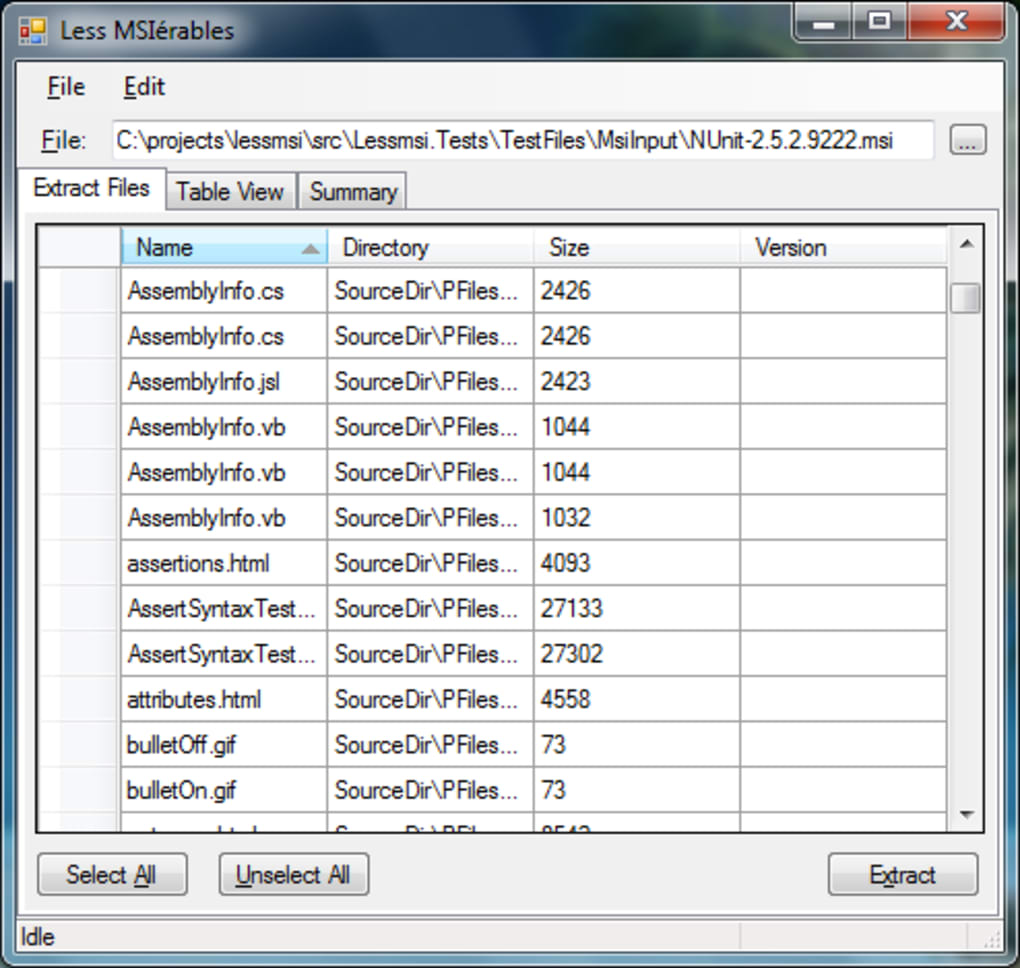
Once you load an MSI file, the interface displays a comprehensive breakdown of its contents under three main tabs: Table View, File Summary, and Data Streams. The Table View allows you to browse database-like structures within the installer, while the File Summary provides a quick overview of all extracted files, including paths and sizes. For advanced users, the Data Streams tab reveals hidden or embedded resources, which can be crucial for forensic analysis or debugging.
Another major advantage is its command-line support, enabling automation and integration into scripts or batch processes. This makes lessmsi a favorite among IT professionals who need to batch-extract installer contents across multiple systems. You can run commands like lessmsi x installer.msi C:\output to extract all files to a specified folder.
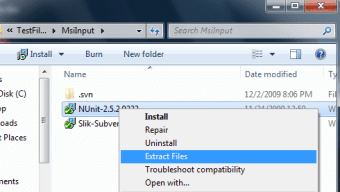
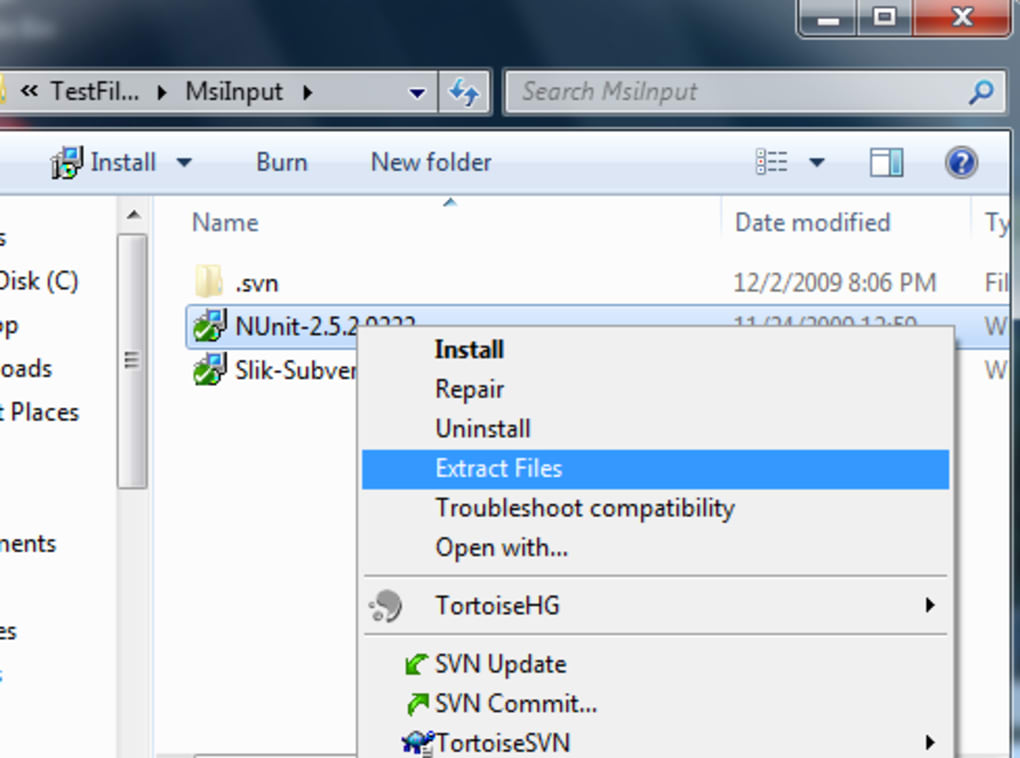
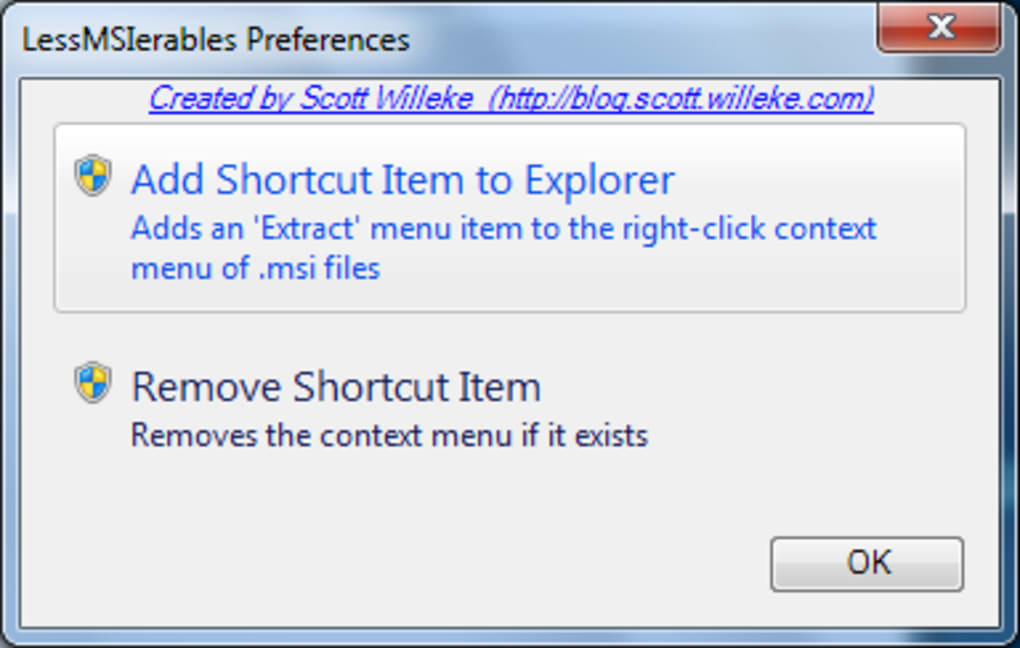
The tool also integrates seamlessly with the Windows right-click context menu, allowing you to extract MSI files with just a few clicks—perfect for on-the-fly access. Additionally, lessmsi is portable and doesn’t require installation, meaning it’s safe to run from USB drives or temporary folders. All operations are performed locally, ensuring your data remains private and secure.
- Extracts files from .msi installer packages without installation
- Supports both GUI and command-line interfaces
- Drag-and-drop functionality for easy file loading
- Comprehensive file and table view for deep inspection
- Right-click integration for quick access on Windows
- Portable – no installation needed, runs from any folder
- Secure and privacy-focused – no data sent to external servers
How to Install and Use lessmsi – Step-by-Step Guide
Getting started with lessmsi is incredibly straightforward, thanks to its portable design. There’s no need to go through a traditional installation process. Simply visit the official website, download the latest version (available for Windows, Mac, and Linux), and extract the ZIP file to your preferred folder. On Windows, you can run lessmsi.exe directly; on Mac and Linux, use the provided binaries with appropriate permissions. Once launched, the GUI appears with a clean, minimal layout—perfect for users of all skill levels.
To extract files, start by dragging and dropping your .msi file into the application window, or click “Open” to browse and select it manually. The tool instantly parses the installer and displays all contents. Navigate to the File Summary tab to see a list of all files, folders, and resources included in the package. You can select individual files or entire directories and click “Extract” to save them to your desired location. For advanced users, the Table View offers access to the underlying database structure of the MSI file, which is useful for understanding installation logic or modifying custom actions.
If you prefer automation, use the command-line interface. Open Command Prompt or PowerShell, navigate to the lessmsi directory, and run the extraction command: lessmsi x "C:\path\to\installer.msi" "C:\output\folder". This method is ideal for scripting or integrating into deployment workflows. Additionally, you can register lessmsi in the Windows context menu by enabling the option during setup (if available), so you can right-click any MSI file and choose “Extract with lessmsi” directly from File Explorer. This feature dramatically speeds up repetitive tasks.
Compatibility & System Requirements – Works Across Platforms
One of the most impressive aspects of lessmsi is its cross-platform compatibility. While originally developed for Windows, the tool now supports Mac (Intel and Apple Silicon) and Linux systems, making it a versatile choice for diverse IT environments. This broad compatibility ensures that developers, system administrators, and support teams can use the same tool regardless of their operating system.
On Windows, lessmsi runs on all modern versions, including Windows 10, Windows 11, and Windows Server editions. No additional runtime dependencies are required—just the executable file. For Mac users, the tool is distributed as a native binary compatible with macOS 10.15 and later. Linux users can run the tool via the provided static binary, which works on most distributions, including Ubuntu, Debian, Fedora, and Arch Linux. The tool is built using .NET Core, ensuring stable performance and minimal resource usage.
Despite its advanced capabilities, lessmsi remains lightweight and fast. It consumes minimal RAM and CPU, even when processing large MSI files (up to several gigabytes). The tool is also free to download and use for personal and commercial purposes, with no hidden fees or trial limitations. Because it’s open-source and transparent, users can verify its integrity and trust it for sensitive tasks like extracting software components for compliance audits or reverse engineering.
- Windows 10/11, Windows Server 2016+
- macOS 10.15 and later (Intel & Apple Silicon)
- Linux (Ubuntu, Debian, Fedora, Arch, etc.)
- Portable – no installation required
- Runs on x64 and ARM64 architectures
- Open-source and community-supported
Pros and Cons – Honest Evaluation of lessmsi
Like any specialized tool, lessmsi has its strengths and limitations. Here’s a balanced look at what makes it stand out—and where it might fall short.
- Pros:
- Free and open-source with no ads or tracking
- Fast, lightweight, and efficient
- Supports GUI and command-line modes
- Easy to use with drag-and-drop and right-click integration
- Portable – runs from USB or any folder
- Secure – no data sent to external servers
- Excellent for auditing, debugging, and file recovery
- Cons:
- No built-in file filtering in CLI mode (extracts all files)
- Limited to .msi files – not suitable for .exe or .zip
- UI is minimal – lacks advanced editing or modification features
- Not available in all languages (primarily English)
- Advanced features require command-line knowledge
Frequently Asked Questions (FAQ)
Here are answers to some of the most common questions about lessmsi, helping you get the most out of this powerful tool.
- Q: Is lessmsi free to use?
Yes, lessmsi is completely free for personal and commercial use. There are no trial periods, subscriptions, or hidden costs. - Q: Can I extract specific files using the command line?
Not directly. The command-line version extracts all files by default. However, you can filter files after extraction using external tools or scripts. - Q: Does lessmsi work on Mac and Linux?
Yes, lessmsi is available for macOS and Linux, with native binaries for both Intel and Apple Silicon Macs, as well as most Linux distributions. - Q: Is lessmsi safe to download?
Absolutely. The tool is open-source, and the official website provides checksums for verification. Always download from the official source to avoid tampered versions. - Q: Can I modify the extracted files and repackage them into a new MSI?
No, lessmsi is only for extraction. To modify and repackage MSI files, you’ll need tools like Orca or Advanced Installer.
Final Verdict – A Must-Have Tool for MSI File Management
If you frequently work with Windows installer packages, lessmsi is an essential addition to your toolkit. Its ability to extract, inspect, and manage .msi files without triggering installation makes it invaluable for system administrators, developers, and IT support professionals. Whether you’re troubleshooting a failed installation, auditing software components, or recovering critical files, lessmsi delivers speed, reliability, and security.
With its portable design, cross-platform support, and seamless integration with both GUI and command-line workflows, it’s a versatile tool that fits into any environment. While it lacks advanced editing features, its focus on extraction ensures it excels at what it was built for.
Download lessmsi today and experience a fast, secure, and free way to unlock the contents of any MSI installer. Perfect for quick access, debugging, or software analysis—this tool just works.







